Blog / Who Connects Your ERP to Your E-Invoicing Provider? Cost and Time, UAE 2026
Who Connects Your ERP to Your E-Invoicing Provider? Cost and Time, UAE 2026
Accredited providers validate, exchange and report your e-invoices, but most install nothing inside your accounting system. Who builds that connection, what it must do, what it costs and what happens if it is late.

The short version
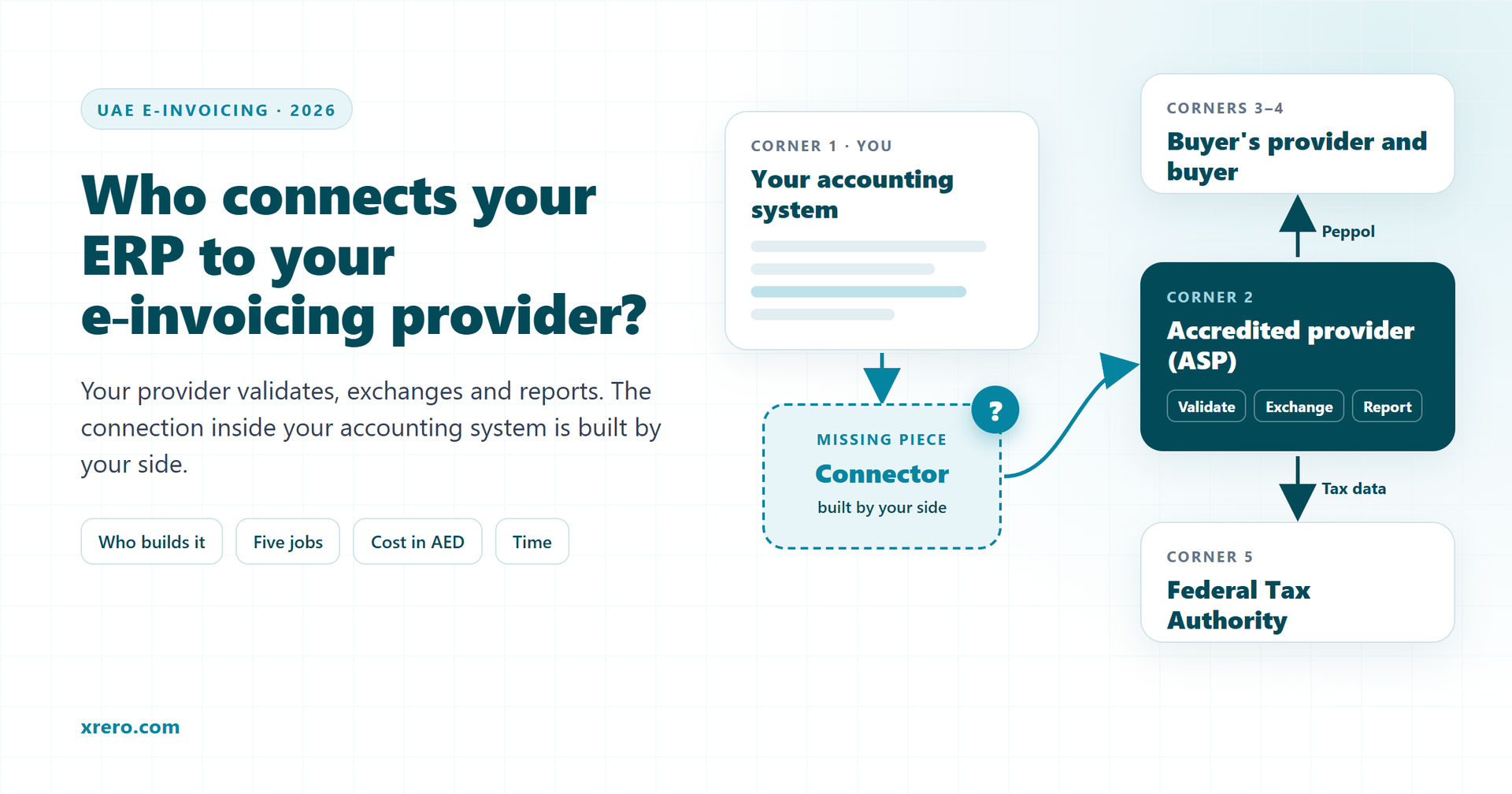
- Your accredited e-invoicing service provider (ASP) validates each invoice, exchanges it over Peppol in the PINT AE format and reports tax data to the FTA. Most providers do not install anything inside your accounting system.
- The connection is built by your IT team, your ERP partner or an integrator. The compliance obligation stays with your business.
- A working connector does five jobs: sends on posting, writes back status, UUID and rejection reason, brings supplier e-invoices into payables, reconciles daily, and alerts.
- The cost depends on the system: in year 1, an Excel/CSV upload or a cloud app costs less than a desktop or ERP connector. Your provider's fee is separate. Xrero sends its prices by e-mail on request.
- Revenue of AED 50 million or more: appoint a provider by 30 October 2026, implement by 1 January 2027. Below that: 31 March 2027 and 1 July 2027.
- Not implementing on time costs AED 5,000 for each month or part of a month (Cabinet Decision No. 106 of 2025).
Your e-invoicing service provider will validate, exchange and report your invoices, but it will usually not install anything inside your accounting system. That connection is built by your IT team, your ERP partner or an integrator. Its cost depends on your system, and it takes weeks, not days.
UAE e-invoicing becomes mandatory in phases from 1 January 2027. Most of the discussion so far has been about choosing an accredited service provider. The harder question comes the day after the contract is signed: who makes your accounting system talk to that provider, and who keeps it working? This guide answers with the Ministry of Finance's own documents, and ends with how Xrero builds the connection as one concrete example.
What does an accredited e-invoicing service provider actually do?
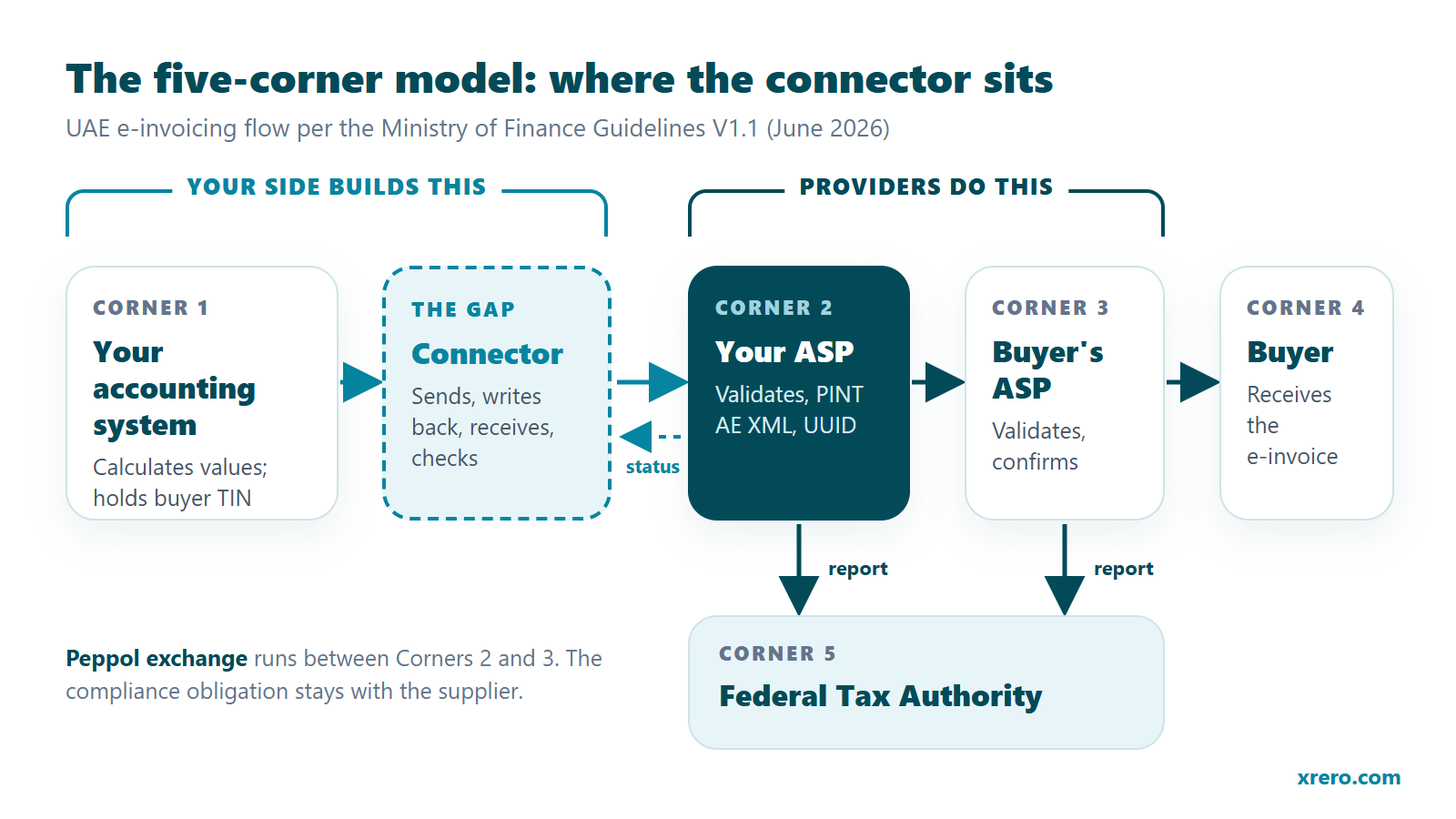
An accredited service provider validates your invoice data, converts it to the UAE XML format, exchanges it with your buyer's provider and reports the tax data to the Federal Tax Authority. The Ministry of Finance describes the design as a decentralised continuous transaction control and exchange model with five corners (MoF e-invoicing page, October 2026), set out step by step in the UAE Electronic Invoicing Guidelines V1.1, section 5.1 (MoF, 1 June 2026):
- Corner 1 is you, the supplier. Your system submits the invoice data to your provider in a format you agree with it.
- Corner 2, your provider, validates the data and converts it into the UAE standard XML e-invoice if needed.
- Corner 2 transmits the e-invoice to Corner 3, the buyer's provider, and in parallel reports tax data to Corner 5, the FTA.
- Corner 3 validates it, confirms to Corner 2, delivers it to the buyer (Corner 4) and reports to the FTA. If validation fails, Corner 3 confirms the failure to Corner 2 and to the FTA instead.
- The confirmations travel back to Corner 1, which is the moment your system should learn whether the invoice was accepted.
The format is PINT AE, the UAE billing specification built on the Peppol International methodology, version 1.0.4 (Peppol). The Guidelines also split the work in a table: the provider secures the transmission, looks up the buyer's Peppol participant identifier and generates a UUID for every e-invoice, while the supplier calculates all invoice values and gathers the buyer's identifier (Guidelines, section 5.2). A footnote to that table adds that providers are engaged to carry out the exchange and reporting, but the compliance obligation remains with the supplier. Each business appoints only one provider for both sending and receiving (Guidelines, section 6.1).
What the provider does not touch is everything before Corner 1: your invoice screen, your posting rules, the customer records that must now carry a TIN and a Peppol identifier, and the payables ledger where supplier e-invoices should land.
Who builds the connection between your accounting system and the provider?
Your side builds it: your own IT team, the partner that sells and supports your ERP, or an independent integrator. Providers supply the API, documentation, a test environment and support, and the Ministry expects them to work with you on any integrations and customisations your existing systems need (Guidelines, Appendix 3). Building inside your system, however, is usually not their job. Providers' own integration pages say the same: the connection inside your system is built by your team, your ERP partner or an integrator.
The Ministry's own readiness checklist reflects the same split. It asks whether you have completed the changes to your ERP or accounting applications to generate the required data points, and whether you have completed the integrations between those applications and your provider's systems to send and receive invoice data (Guidelines, Appendix 2). Onboarding with the provider is also started by the business itself through EmaraTax, not by the provider (Guidelines, section 9).
| Party | What it usually does | What it usually does not do | The right builder when... |
|---|---|---|---|
| E-invoicing provider (ASP) | Validates, converts to PINT AE XML, exchanges over Peppol, reports to the FTA, generates the UUID, returns status messages; offers an API and often a web portal | Install or change software inside your accounting system; clean your customer data | Never the builder inside your ERP; always the other end of the connection |
| ERP vendor or ERP partner | Knows your system, licences, customisations and upgrade path; may ship a built-in route when the software maker is itself a provider | Build for a provider it does not already support; follow the provider's API changes after go-live unless contracted to | You run a major ERP with an active partner contract, or the maker is your provider |
| Independent integrator | Builds, tests, installs and monitors the connector between your system and the provider you chose | Replace your provider or take over your compliance obligation | Your system is desktop, cloud or an older ERP with no built-in route, or your partner does not do API work |
| Your business | Appoints the provider through EmaraTax, calculates invoice values, collects buyer TINs and Peppol identifiers, approves go-live, keeps the obligation | Hand the legal obligation to anyone else | Always involved; builds the connector alone only with an in-house developer who will also maintain it |
What kinds of providers are on the Ministry of Finance register?
The register lists 69 accredited service providers, plus 3 pre-approved providers under final accreditation assessment (MoF, page updated 19 October 2026). They fall into four broad groups, and no group is right or wrong in itself:
- Accounting and ERP software makers that are also accredited. The register includes Tally, Zoho, SAP, Wafeq and Focus Softnet. If your software's maker is also your provider, the route may be built in, but check what it covers. Tally, for example, gives access to its UAE e-invoicing services with an active TSS (Tally terms, 17 July 2026), while its FAQ says retrieving supplier e-invoices "is not yet supported" in TallyPrime (Tally FAQ, 12 October 2026).
- Global e-invoicing networks that run Peppol and tax-reporting services in many countries. They tend to offer broad APIs and ready connectors for large ERPs.
- Audit, tax and consulting firms that hold an accreditation. They often combine the exchange service with advisory or implementation projects.
- Local and regional technology providers, typically with an API, a web portal and plans sized for smaller volumes.
The Ministry's guide to choosing a provider lists the questions that matter: whether the provider can integrate with your current ERP or accounting system, where the e-invoicing data is stored, support response times and uptime commitments, the pricing model, and any hidden fees (MoF, Considerations for selecting an ASP, 23 February 2026). Ask the integration question in writing. "Yes, through our API" and "yes, we install it in your system" are different answers.
Why do small businesses on desktop and cloud systems fall into a gap?
Because their system has no built-in route to their provider, and nobody in the chain is paid to build one. Large ERPs have partners who run integration projects. Small businesses usually bought their software from a reseller who sells licences and training, not API development, and the provider stops at its own API.
The technical shape of the gap differs by system family:
- Desktop and on-premises software (TallyPrime, Sage 50, BUSY, Al-Ameen, older Dynamics NAV or GP). The books sit on a PC or an office server; the provider sits in the cloud. Something has to run beside the software, read posted invoices through its own interface, send them, and write the answer back.
- Cloud accounting apps (QuickBooks Online, Zoho Books, Xero, Daftra). Nothing is installed, but the connection must run on a server that reaches your account through the app's API, watches for new invoices and is itself monitored every day.
- Extendable ERPs (Business Central, NetSuite, SAP Business One, ERPNext, open-source ERPs). The connection is an add-on inside the ERP, and it has to survive every version upgrade.
- Systems with no interface at all. An Excel or CSV export, uploaded on a schedule, is the honest minimum.
Volume widens the gap. A business issuing 100 to 300 invoices a month has too many to retype safely and too few to justify an enterprise integration project. And size is no exemption: e-invoicing covers every person making a business transaction in the UAE, whatever its VAT registration status, while supplies to consumers are outside the scope (Guidelines, section 6).
What must an ERP-to-provider integration do before you can rely on it?
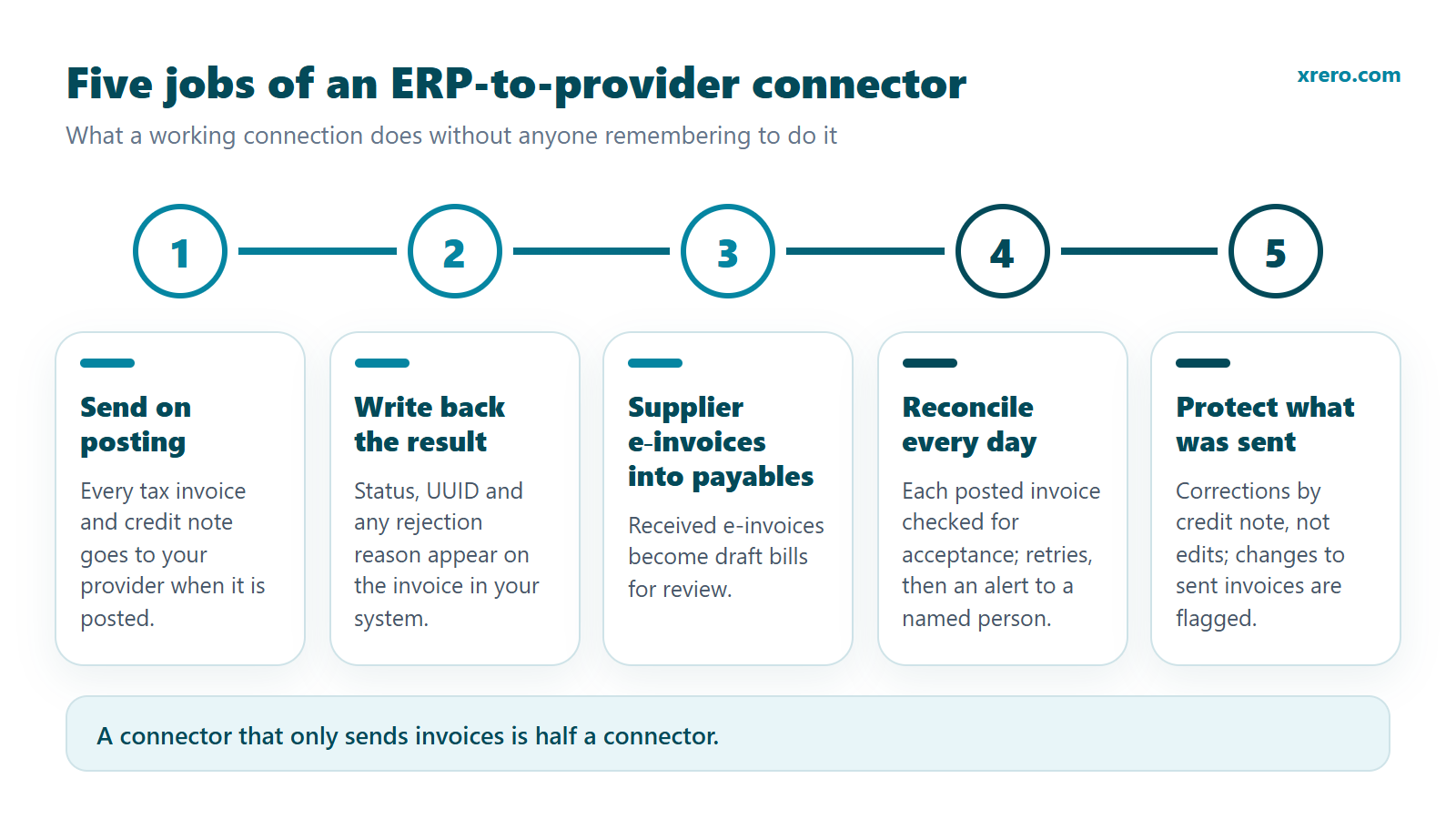
It must do five jobs without anyone remembering to do them. A connector that only sends invoices is half a connector.
- Send on posting. Every tax invoice and credit note goes to the provider when it is posted, carrying the fields in the Ministry's list of mandatory e-invoice fields (MoF, V1.0, 23 February 2026), including the buyer's TIN, which is the first 10 digits of the 15-digit TRN (MoF Considerations, glossary), and the buyer's Peppol participant identifier.
- Write back the result. The provider's status, the UUID and any rejection reason appear on the invoice in your own system, so the accountant fixes errors where the invoice lives, not in a second portal.
- Bring supplier e-invoices into payables. Because one provider handles both sending and receiving, the e-invoices your suppliers send you arrive at your provider. A connector should create them as draft bills for review, not leave them waiting in a portal.
- Reconcile every day. Every posted invoice is checked against an accepted status. Failures are retried automatically, and a named person is alerted when a retry does not clear them.
- Protect what was sent. Once an invoice is accepted, a correction goes through a credit note, not an edit. The connector should flag any change to an invoice that has already been sent.
The Guidelines expect testing to cover four flows: transmitting invoice data to the provider, the provider issuing the invoice to the buyer, receiving the success or failure message, and receiving supplier e-invoices through the provider (Guidelines, section 13.3). If an integrator's test plan skips the last two, the plan is incomplete.
See how the connector works WhatsApp us
What questions should you ask any integrator, and what are the red flags?
Ask these eight questions before you sign, and keep the answers in writing:
- Which of the five jobs above are in the price, and which are a later phase with no date?
- Does the connector use my system's approved interface (an API, an add-on, an SDK or an export), or does it write directly into the database?
- Where does invoice data pass and where is it stored, and will you sign a data processing agreement?
- When the provider changes its API, or the FTA changes a rule, who updates the connector and who pays?
- What happens when my accounting system is upgraded to a new version?
- Who receives the alert when an invoice is rejected late in the evening before a holiday, and how fast do you reply?
- If I stop paying for support, does the connector keep working, and can I export my data?
- Is the go-live date tied to anything outside your control, such as the provider's sandbox access or my own data clean-up?
And watch for these red flags:
- "Automation" that turns out to be a file you export and upload by hand every day.
- No write-back: the invoice status lives only in the provider's portal.
- Supplier e-invoices sold as "phase 2" with no date and no price.
- A fixed go-live date promised before anyone has mapped your real invoices.
- An integrator that calls itself an accredited e-invoicing provider but is not on the Ministry of Finance register, which is public.
- A price with no yearly support line. Rules, APIs and your own software will change after go-live.
How much does an ERP-to-provider connection cost, and how long does it take?
Budget for four separate items: the provider's own fee, the one-off build, yearly support and your team's time. The provider's fee is set by the provider, often by subscription or per transaction (MoF Considerations, section 3.2.5), so compare it separately from the connector. Each integrator sets its own prices.
| Cost item | Who charges | What drives it |
|---|---|---|
| Provider (ASP) fee | Your provider | Invoice volume, plan, extras |
| Readiness check | Integrator | Number of invoice types to map |
| Connector build, with 12 months of support | Integrator | System family and version |
| Yearly support from year 2 | Integrator | Hosting, monitoring, rule and API changes |
| Your team's time | You | Quality of customer records: TINs, Peppol identifiers, tax codes |
Time depends on whether a connector for your system already exists. At Xrero, the connector for open-source ERPs goes live in January 2027 for version 17 and February 2027 for versions 18-20, and Excel/CSV upload in January 2027. Other systems are built on first order: Business Central in 8-11 weeks, NetSuite and SAP Business One in 7-12 weeks, ERPNext in 8-12 weeks, TallyPrime in 12-16 weeks, and cloud apps in 10-14 weeks for the first app, then 3-4 weeks for each further app. These are Xrero's own lead times, not market averages.
If your company has revenue of AED 50 million or more and runs a system with no ready connector, do the arithmetic now. Twelve weeks from late October 2026 lands in mid-to-late January 2027, after the 1 January 2027 date. Plan a bridge for those weeks, and start the readiness check early.
What happens if your business is not connected by its date?
The obligation does not wait for your connector. The dates come from Ministerial Decision No. 244 of 2025, Article 5(1), as amended by Ministerial Decision No. 66 of 2026 (MoF, May 2026):
| Who | Appoint a provider by | Implement e-invoicing by |
|---|---|---|
| Revenue of AED 50,000,000 or more | 30 October 2026 | 1 January 2027 |
| Revenue below AED 50,000,000 | 31 March 2027 | 1 July 2027 |
| Government entities | 31 March 2027 | 1 October 2027 |
If the integration is not ready, invoices still have to go through your provider. In practice that means typing them into the provider's web portal, where one is offered. It works as a bridge for low volumes, but every invoice is entered twice, invoice numbers and amounts must match your books exactly, rejections are fixed in two places, and supplier e-invoices sit in the portal instead of your payables. A readiness check that includes portal training keeps that bridge short and safe.
Penalties are set by Cabinet Decision No. 106 of 2025 on violations and administrative penalties for the e-invoicing system (MoF), in force from the day after it is published. For failing to implement the system, including failing to appoint a provider within the timeline, the table sets "AED 5,000 in case of delay for each month or part thereof".
| Violation (Cabinet Decision No. 106 of 2025, annexed table) | Administrative penalty |
|---|---|
| Issuer fails to implement the system, including failing to appoint a provider on time | AED 5,000 for each month of delay or part of a month |
| Issuer fails to issue and transmit an e-invoice on time | AED 100 per e-invoice, up to AED 5,000 per calendar month |
| Issuer fails to issue and transmit an e-credit note on time | AED 100 per e-credit note, up to AED 5,000 per calendar month |
| Issuer or recipient fails to notify the FTA of a system failure on time | AED 1,000 for each day of delay or part of a day |
| Issuer or recipient fails to notify its provider of changes to data registered with the FTA | AED 1,000 for each day of delay or part of a day |
The decision does not apply to anyone exchanging e-invoices on a voluntary basis (Article 2). Every date and threshold is collected in our UAE e-invoicing dates and penalties guide and on the e-invoicing page.
How does Xrero connect your accounting system to your e-invoicing provider?
Xrero builds, installs, tests and supports the connector between your existing accounting system and the provider you have appointed. The connector does the four jobs that matter most: it sends tax invoices and credit notes to your provider automatically when they are posted; writes the provider's status, UUID and any rejection reason back on the invoice; brings supplier e-invoices into payables as drafts; and checks every day that every posted invoice was accepted, with retries and alerts. Xrero is not an e-invoicing service provider and does not replace yours. It works with whichever provider on the Ministry of Finance register you have chosen, and your contract stays with that provider.
How it is installed depends on your system. For open-source ERPs (Community / Enterprise editions, self-hosted), ERPNext, Business Central, NetSuite and SAP Business One it is an add-on inside the ERP. For QuickBooks Online, Zoho Books, Xero, Daftra and the open-source ERP's online edition nothing is installed: you connect your account online and the connector runs on Xrero's servers. For TallyPrime, Sage 50, BUSY, Al-Ameen, Dynamics NAV, GP or AX, Business Central on-premises and in-house SQL systems, a small Windows agent runs on your PC or server. Any system without an interface can use Excel/CSV upload. For SAP S/4HANA, Oracle Fusion, EBS or JD Edwards, Dynamics 365 F&O and Infor LN/M3, it is a project with your certified ERP partner, where Xrero delivers the mapping, the test pack and the coordination.
Prices are sent by e-mail on request: write to info@xrero.com with your accounting system and your e-invoicing provider.
The cost depends on the system: in year 1, an Excel/CSV upload or a cloud app costs less than a desktop or ERP connector, and enterprise systems are a project with your certified partner. Year 1 is setup plus 12 months of support; from year 2, yearly support is recommended, and required for hosted connectors. Start with the readiness check: 20 real invoices mapped, the data gaps listed, a firm price and go-live week, plus 1 hour of training on your provider's web portal. Payment is 50% on order and 50% at go-live; VAT is added if applicable.
Support covers every FTA e-invoicing rule change, every change to your provider's API, updates of your own system, the daily check with alerts 7 days a week, and connector faults fixed at no charge, plus 4 support hours a year (2 for Excel/CSV). Support hours are Monday to Friday, 09:00-18:00 Dubai time, with a reply within 4 business hours when invoices stop. If you do not renew, a connector on your own system keeps working, with no lock; only updates, monitoring and support stop. Hosted connectors stop 30 days after the last paid year, with a full export of your data.
Full details and the order form are on the e-invoicing integration page. You can also call +971 54 468 2468, message us on WhatsApp at +971 55 776 9320, or write to info@xrero.com.
See how the connector works WhatsApp us
Frequently asked questions
Will my e-invoicing service provider install the integration inside my ERP?
Usually not. Providers validate, exchange and report e-invoices, and give you an API, documentation and a test environment; the Ministry of Finance expects them to work with you on integration. The build inside your accounting system is normally done by your IT team, your ERP partner or an integrator. Ask your provider in writing which parts it does.
Can I use my provider's web portal instead of an integration?
Yes, as a bridge. Many providers let you key invoices into a web portal. It suits low volumes, but every invoice is typed twice, totals must match your books exactly, rejections are fixed in two places, and supplier e-invoices stay in the portal instead of reaching your payables.
How much does it cost to connect Tally, QuickBooks Online or Zoho Books to an e-invoicing provider?
It depends on the system. TallyPrime connects through a small Windows agent on the Tally PC or server; QuickBooks Online, Zoho Books, Xero and Daftra connect online, with nothing installed. In year 1 (setup plus 12 months of support) a cloud app costs less than a desktop connector. Your provider's own fee is separate. Xrero sends its prices by e-mail on request: write to info@xrero.com with your accounting system and your e-invoicing provider.
How long does an ERP e-invoicing integration take in the UAE?
It depends on whether a connector for your system already exists. At Xrero, open-source ERP and Excel/CSV connectors go live in January-February 2027; other systems are built on first order, for example Business Central in 8-11 weeks, TallyPrime in 12-16 weeks and the first cloud app in 10-14 weeks. Start with a readiness check on 20 real invoices.
What is the penalty for not implementing e-invoicing on time in the UAE?
Under Cabinet Decision No. 106 of 2025, failing to implement the system, including failing to appoint a provider on time, costs AED 5,000 for each month or part of a month of delay. Failing to issue and transmit an e-invoice costs AED 100 per invoice, up to AED 5,000 per calendar month.
Does the integration also bring supplier e-invoices into my accounts payable?
It should. You appoint one provider for both sending and receiving, so your suppliers' e-invoices arrive there. A complete connector creates them as draft bills in your payables for review. Some built-in routes do not do this yet, so ask before you sign.
Does Xrero replace my e-invoicing service provider?
No. Xrero is not an e-invoicing service provider and does not replace one. It builds, installs and supports the connector between your accounting system and the provider you appointed from the Ministry of Finance register, whichever provider that is. Your contract with the provider stays in place.
Is Xrero the same company as Xero?
No. Xrero (xrero.com) is a Dubai-based business software company. Xero is a separate accounting software company with no connection to Xrero. Xero is one of the cloud apps Xrero can connect to your e-invoicing provider.
About the publisher: Xrero (xrero.com; in Arabic إكسريرو) is a Dubai-based business software company. Xrero is not Xero and is not connected to it. This article is general information drawn from Ministry of Finance publications and providers' own pages, not legal or tax advice on your specific case.
Page updated 20 October 2026.