Blog / How to Connect Your Accounting Software to UAE E-Invoicing (2026)
How to Connect Your Accounting Software to UAE E-Invoicing (2026)
Tally, QuickBooks, Zoho Books, Xero, Sage, Microsoft Dynamics, NetSuite, SAP and others: the five ways to connect, what to prepare, the deadlines, and what it costs to have it built and run for you.

The short version
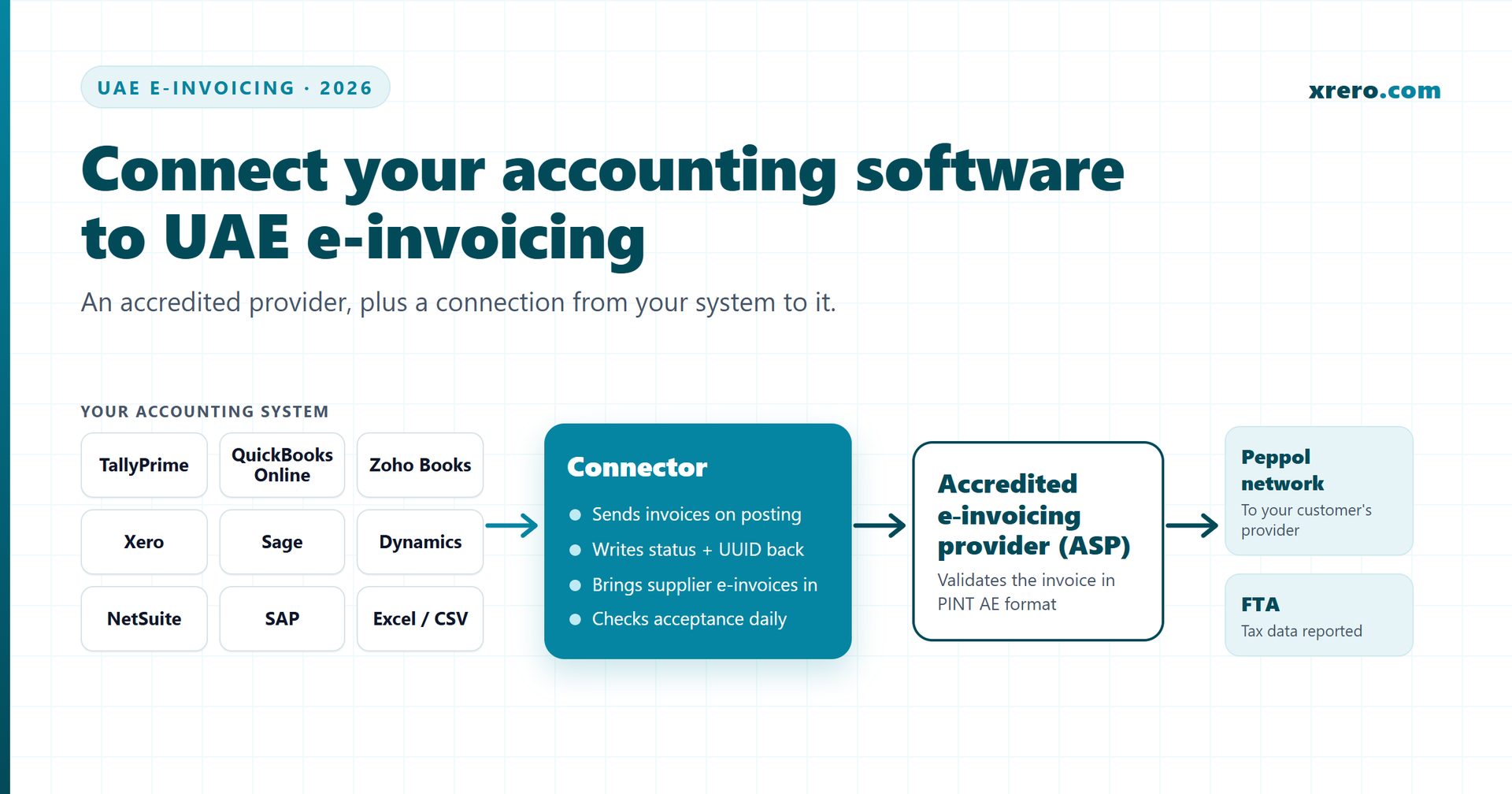
- To issue e-invoices in the UAE you need two things: an accredited e-invoicing service provider (ASP) and a connection from your accounting system to it.
- The provider validates each invoice, exchanges it over Peppol and reports it to the FTA. The connection on your side is usually yours to arrange.
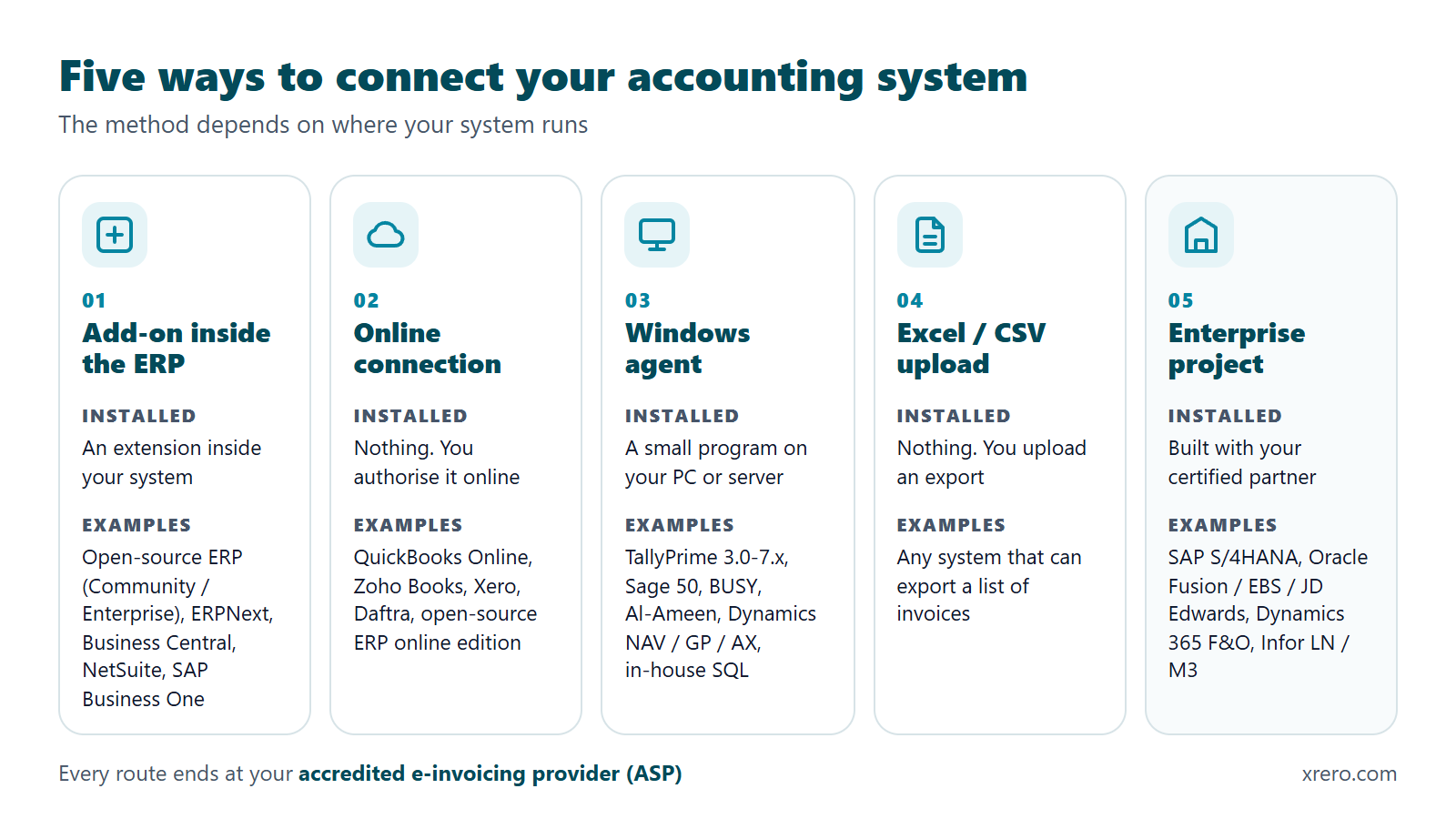
- There are five ways to connect: an add-on inside the ERP, an online connection for cloud apps, a small Windows agent for desktop software, an Excel/CSV upload, or an enterprise project with your certified partner.
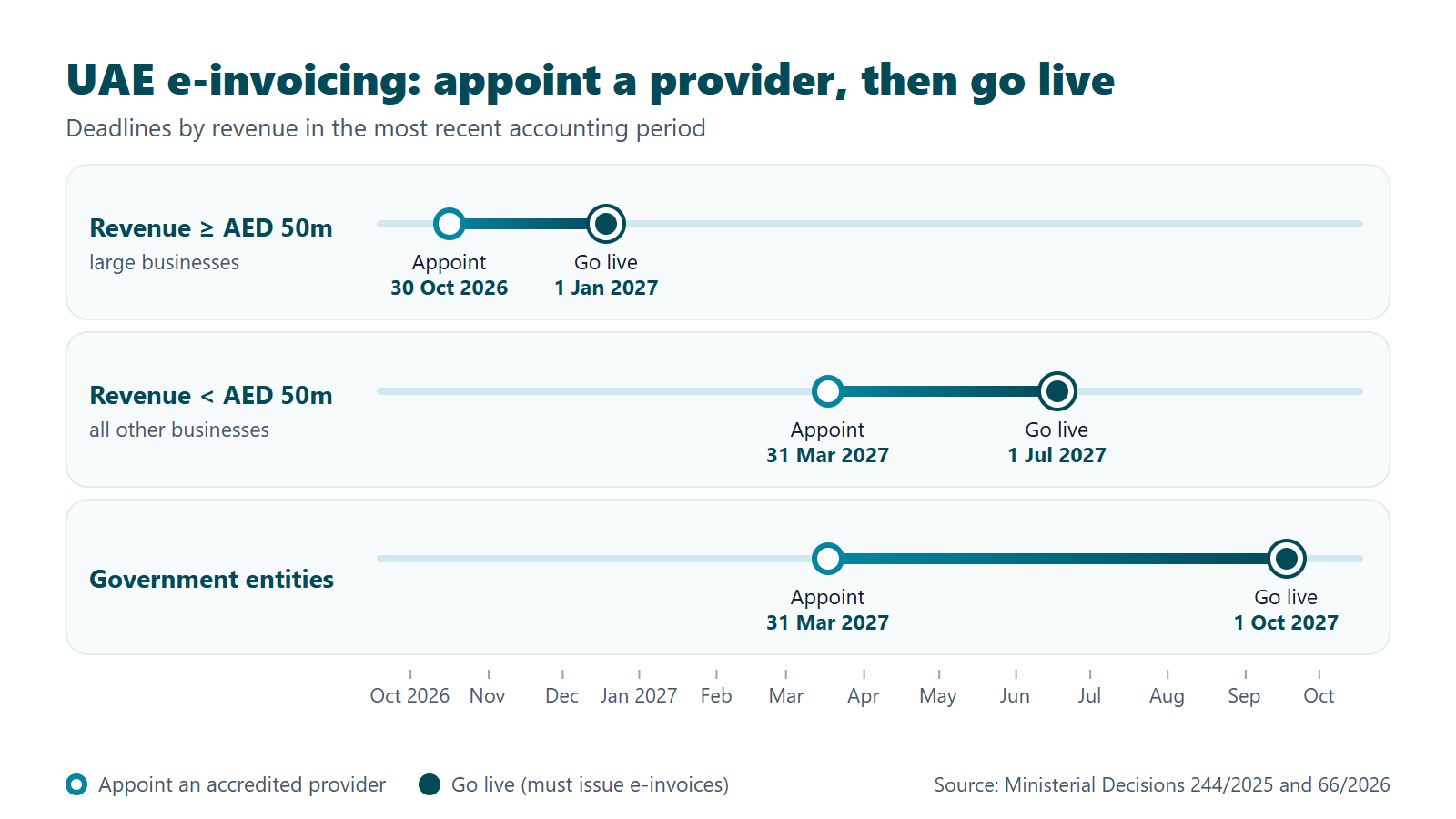
- Revenue of AED 50 million or more: appoint a provider by 30 October 2026 and go live by 1 January 2027. Below that: 31 March 2027 and 1 July 2027.
- Before anything is built, clean four things: customer TRNs, tax codes, units of measure and credit-note references.
To issue e-invoices in the UAE you need two things: an accredited e-invoicing service provider (ASP) that you appoint, and a connection that sends every tax invoice and credit note from your accounting system to that provider and records the result. The provider handles the exchange and the FTA reporting. The connection is your side of the job.
What do you need to issue e-invoices in the UAE?
You need an accredited service provider and a working connection to it. Neither one is enough alone.
1. An accredited e-invoicing service provider (ASP). Every business in scope must appoint one. The Ministry of Finance keeps a public register of accredited e-invoicing service providers (Ministry of Finance, 69 entries on 20 October 2026). The provider receives your invoice, checks it against the UAE format, PINT AE, the UAE billing specification on the Peppol network (OpenPeppol, version 1.0.4), delivers it to your customer's provider over the Peppol "5-corner" model, and reports the data to the Federal Tax Authority.
2. A connection from your accounting system to that provider. Your invoices are created in Tally, QuickBooks, Zoho Books, Xero, Sage, Business Central, NetSuite, SAP or a similar system. Something has to take each invoice from there to the provider at the moment it is posted, and bring back the answer: accepted, with a unique ID, or rejected, with the reason.
Most providers offer three things: an API, a web portal and the Peppol exchange. Most do not install anything inside your accounting system. Typing invoices into a portal works for a few a month. With dozens or hundreds, it means entering everything twice, and your books can drift away from what was reported. That gap is what a connector closes.
One limit on scope matters. Under Ministerial Decision 244 of 2025, Article 5(2) (Ministry of Finance, 2025), business-to-consumer transactions are not subject to the e-invoicing system for now. The obligation covers invoices to businesses (B2B) and to government (B2G). For background on the whole system, see our UAE e-invoicing overview.
When must your business be connected?
It depends on your revenue. Large businesses must be live on 1 January 2027; everyone else on 1 July 2027.
| Who | Appoint a provider by | Go live by |
|---|---|---|
| Revenue of AED 50 million or more | 30 October 2026 | 1 January 2027 |
| Revenue below AED 50 million | 31 March 2027 | 1 July 2027 |
| Government entities | 31 March 2027 | 1 October 2027 |
The phases come from Ministerial Decision 244 of 2025, Article 5(1) (Ministry of Finance, 2025). The first appointment date for large businesses was moved from 31 July 2026 to 30 October 2026 by Ministerial Decision 66 of 2026 (Ministry of Finance, 2026); the go-live date of 1 January 2027 did not change. "Revenue" means gross income in your most recent accounting period, taken from your financial statements (Article 1 of Decision 244). Any business may also join voluntarily from 1 July 2026 (Article 4).
Plan backwards from the go-live date. Appointing a provider is a contract. The connection is a build: it needs your data cleaned, a test round with the provider and a few weeks of parallel checking. For every date and the penalty rules, read our guide to UAE e-invoicing dates, thresholds and penalties.
How does the connection work for each type of accounting system?
The method depends on where your system runs: on a server you control, in the vendor's cloud, on a Windows PC, or nowhere you can reach. There are five families.
1. An add-on inside the ERP
Systems that accept extensions get the connector installed inside them. This covers the open-source ERP (Community / Enterprise editions, self-hosted), ERPNext, Microsoft Dynamics 365 Business Central, Oracle NetSuite and SAP Business One. When you post an invoice, the add-on sends it to your provider. The status, the unique ID and any rejection reason appear on the invoice itself, so your accountant sees them where they already work.
2. An online connection for cloud apps
Cloud accounting apps do not let you install software, so nothing is installed. You authorise the connection from your account online, and the connector runs on the connector provider's servers. It reads posted invoices through the app's interface and writes the result back. This covers QuickBooks Online, Zoho Books, Xero, Daftra and the open-source ERP's online edition.
3. A small Windows agent for desktop software
Desktop and on-premises systems run on your own PC or server. A small Windows program, the agent, is installed next to them. It reads posted invoices locally and sends them to your provider. This covers TallyPrime 3.0 to 7.x, Sage 50, BUSY, Al-Ameen, Dynamics NAV, GP and AX, Business Central on-premises, and in-house systems on SQL databases. The one practical rule: the computer must be on and the accounting program available when invoices are sent.
4. An Excel or CSV upload
Some systems have no interface at all. They can still export a list of invoices. You upload the file, the connector checks every line, sends the valid invoices to your provider and returns a report of what was accepted and what needs fixing. It is the simplest route for low volumes.
5. An enterprise project with your certified partner
Large platforms, such as SAP S/4HANA, Oracle Fusion, E-Business Suite or JD Edwards, Dynamics 365 Finance and Operations, and Infor LN or M3, are changed through the partner that maintains them. Here the connection is a project. The connector specialist delivers the field mapping, the test pack and the coordination between your partner and your provider.
Whatever the method, a complete connection does four jobs:
- it sends tax invoices and credit notes to the provider automatically when they are posted;
- it writes the provider's status, the invoice's unique ID (UUID) and any rejection reason back on the invoice;
- it brings supplier e-invoices into payables as drafts, so you do not retype them;
- it checks every day that every posted invoice was accepted, retries what failed and alerts a person when something is stuck.
Ask any vendor which of the four their connector does. A connector that only sends, and never checks, leaves you to find rejected invoices yourself.
Which method fits your system, and how long does it take?
Find your system in the table. The times are Xrero's delivery times. Some connectors have fixed dates; others are built when the first client for that system orders, so the time counts from that order.
| Your system | Method | What is installed | Typical time |
|---|---|---|---|
| Open-source ERP (Community / Enterprise), versions 17 to 20, self-hosted | Add-on inside the ERP | An add-on module | Version 17: January 2027. Versions 18 to 20: February 2027 |
| ERPNext | Add-on inside the ERP | An app inside ERPNext | 8 to 12 weeks from the first order |
| Microsoft Dynamics 365 Business Central (SaaS v26+) | Add-on inside the ERP | An extension | 8 to 11 weeks from the first order |
| Oracle NetSuite, SAP Business One | Add-on inside the ERP | An add-on | 7 to 12 weeks from the first order |
| QuickBooks Online, Zoho Books, Xero, Daftra | Online connection | Nothing; you authorise online | 10 to 14 weeks for the first app, then 3 to 4 weeks for each next app |
| TallyPrime 3.0 to 7.x | Windows agent | A small program on the Tally PC or server | 12 to 16 weeks from the first order |
| Sage 50, BUSY, Al-Ameen, Dynamics NAV / GP / AX, Business Central on-premises, in-house SQL | Windows agent | A small program on your PC or server | Built on the first order; the go-live week is set at the readiness check |
| Any system that can export invoices | Excel / CSV upload | Nothing | January 2027 |
| SAP S/4HANA, Oracle Fusion / EBS / JD Edwards, Dynamics 365 F&O, Infor LN / M3 | Enterprise project with your certified partner | Set with your partner | Planned with your partner |
If your revenue is below AED 50 million, your go-live date is 1 July 2027. A 12-to-16-week build is comfortable if you order early in 2027, and tight if you order in the spring. Large businesses facing 1 January 2027 should check the dates above against their own system before they sign.
See how the connector works and book a readiness check WhatsApp us
What should you prepare before the connection is built?
Clean your data first. Most rejected e-invoices are caused by the data in the accounting system, not by the connection. Four items cause most of the work:
- Customer TRNs. Every business customer needs its correct Tax Registration Number in the customer record. A missing or mistyped TRN is a rejected invoice.
- Tax codes. Each VAT treatment you use, standard-rated, zero-rated, exempt, reverse charge or out of scope, should map to one clear tax code. Generic codes such as "misc" cannot be mapped.
- Units of measure. Items and services need units that can be matched to the standard unit codes the PINT AE format expects. "Pcs", "pieces" and "nos" for the same thing must become one.
- Credit-note references. Every credit note must point to the original invoice it corrects. Credit notes raised "on account", with no reference, need a rule agreed before go-live.
Also decide two things inside the company: who receives the alert when an invoice is rejected, and who is allowed to fix and resend it. Then ask your provider for test (sandbox) access, so the connection can be tested before real invoices flow.
A short readiness check makes all of this visible. Xrero's version maps 20 of your real invoices, lists every data gap and ends with a firm price and a go-live week.
What if your accounting software's vendor is itself an e-invoicing provider?
Then the built-in route is often the simplest, and you may not need a separate connector. Some software makers appear on the Ministry of Finance register (20 October 2026) themselves, including Tally Software Solutions FZCO, Zoho Software Trading LLC, SAP Middle East & North Africa LLC, Wafeq and Focus Softnet. Most entries on the register, though, are pure e-invoicing providers. Here are the facts for the two names SMEs ask about most.
TallyPrime
Tally describes itself as an MoF-listed ASP for UAE e-invoicing (Tally Solutions, 2026). According to its UAE release notes (Tally Solutions, updated 12 October 2026), TallyPrime 7.2 can exchange e-invoices individually or in bulk directly from TallyPrime and track their status. Tally's e-invoicing terms (Tally Solutions, 2026) say an active TSS comes with complimentary access to the service. The same terms say data may be stored or accessed outside the UAE, and cap Tally's total liability at AED 2,000. Tally's e-invoicing FAQ (Tally Solutions, 2026) says retrieving purchase data for supplier e-invoices is not yet supported, and that e-invoicing is not supported through remote access.
Zoho Books
Zoho says it is an accredited e-invoicing service provider recognised by the UAE Ministry of Finance (Zoho, 2026). Invoices go over the Peppol 5-corner model directly from Zoho Books, and vendors' e-invoices can be fetched into Zoho Books. The first 100 e-invoicing transactions are included on the Professional plan and above; extra packs start at AED 41 per 100 transactions.
When might a business still choose another provider?
Both routes are legitimate. A business on Tally or Zoho may still pick a different provider when:
- it runs several companies on different systems and wants one provider, one contract and one view across all of them;
- it needs supplier e-invoices to arrive in payables on Tally today;
- data location or contract terms, such as the liability cap, matter to its auditors or its group;
- it runs Tally over remote desktop, or cannot keep TSS and the latest release current;
- its group or its accountant has already appointed a provider for the other entities.
If you stay with your vendor's built-in provider, you do not need a third-party connector for that system. If you choose another provider, the connection to it is what has to be built.
Who can build and run the connection for you?
Xrero does. Xrero (xrero.com) is a Dubai-based business software company. We build, install, test and support the connector between your existing accounting system and the e-invoicing provider you have chosen. Xrero is not an e-invoicing service provider and does not replace yours. We work with any provider on the Ministry of Finance register, and you keep your own contract with it.
The connector does the four jobs above: it sends invoices and credit notes on posting, writes the status, UUID and rejection reason back, brings supplier e-invoices into payables as drafts, and checks every day that every posted invoice was accepted, with retries and alerts.
Prices are sent by e-mail on request: write to info@xrero.com with your accounting system and your e-invoicing provider.
The cost depends on the system. In year 1, an Excel/CSV upload or a cloud app costs less than a desktop or ERP connector, and enterprise systems are a project with your certified partner. Year 1 is the setup plus 12 months of support. Year 2 onwards is yearly support: recommended for every connector, required for hosted ones. Payment is 50% on order and 50% at go-live, and VAT is added where it applies.
Yearly support covers: every FTA e-invoicing rule change, every API change at your provider, updates of your own system, the daily check with alerts 7 days a week, connector faults fixed at no charge, and 4 support hours a year (2 for Excel/CSV). Support hours are Monday to Friday, 09:00 to 18:00 Dubai time, with a reply within 4 business hours when invoices stop.
If you do not renew: a connector on your own system keeps working; there is no lock. Updates, monitoring and support stop. A hosted connector stops 30 days after the last paid year, and you receive a full export of your data.
Full details are on the e-invoicing integration page. To start, call +971 54 468 2468, send a WhatsApp message to +971 55 776 9320, or write to info@xrero.com.
See how the connector works and book a readiness check WhatsApp us
Frequently asked questions
Do I need an e-invoicing service provider if my accounting software already makes PDF invoices?
Yes. A PDF is not an e-invoice under the UAE system. Each B2B and B2G tax invoice must go through an accredited e-invoicing service provider (ASP), which validates it, exchanges it over Peppol in the PINT AE format and reports it to the FTA. Your accounting software stays; it just needs a connection to the provider.
Can I type my invoices into the provider's web portal instead of connecting my system?
For a handful of invoices a month, yes: most providers offer a web portal. With dozens or hundreds of invoices it means typing everything twice, with a real risk of differences between your books and what was reported. A connection sends each invoice when you post it and writes the result back on the invoice.
Does UAE e-invoicing apply to sales to consumers (B2C)?
Not for now. Ministerial Decision 244 of 2025, Article 5(2), says business-to-consumer transactions are not subject to the e-invoicing system, and a business that sells only to consumers is outside it, until the Minister decides otherwise.
I use TallyPrime with an active TSS. Do I need a separate connector?
Often not. Since TallyPrime 7.2 you can exchange e-invoices directly through Tally's own provider, and Tally's terms say an active TSS comes with complimentary access. A connector to another provider makes sense if you need supplier e-invoices in payables, run several companies on different systems, or prefer a provider with other terms.
How long does it take to connect my system?
It depends on the system. Xrero's connector for the open-source ERP (Community / Enterprise editions) version 17 and the Excel/CSV upload are due in January 2027. Others are built on the first order: about 12-16 weeks for TallyPrime, 8-11 for Business Central, 7-12 for NetSuite or SAP Business One, 8-12 for ERPNext.
What happens if I stop paying for yearly support?
A connector installed on your own system keeps working; there is no lock. Updates for rule and API changes, the daily check, monitoring and support stop. A hosted connector (cloud apps and Excel/CSV) stops 30 days after the last paid year, and you receive a full export of your data.
What does the readiness check include?
Xrero maps 20 of your real invoices, lists the data gaps to fix, and gives you a firm price and a go-live week, plus 1 hour of training on your provider's web portal. Its price is sent by e-mail on request: write to info@xrero.com.
Is Xrero the same as Xero?
No. Xrero (xrero.com) is a Dubai-based business software company. Xero is a New Zealand accounting software company. They are not connected. Xrero can build a connector for businesses that use Xero.
About the publisher: Xrero (xrero.com; in Arabic إكسريرو) is a Dubai-based business software company. Xrero is not Xero and is not connected to it.
Page updated 20 October 2026.