The short version
- Each invoicing device is onboarded, and again at every certificate renewal: an OTP from the Fatoora portal, compliance checks, then a production CSID.
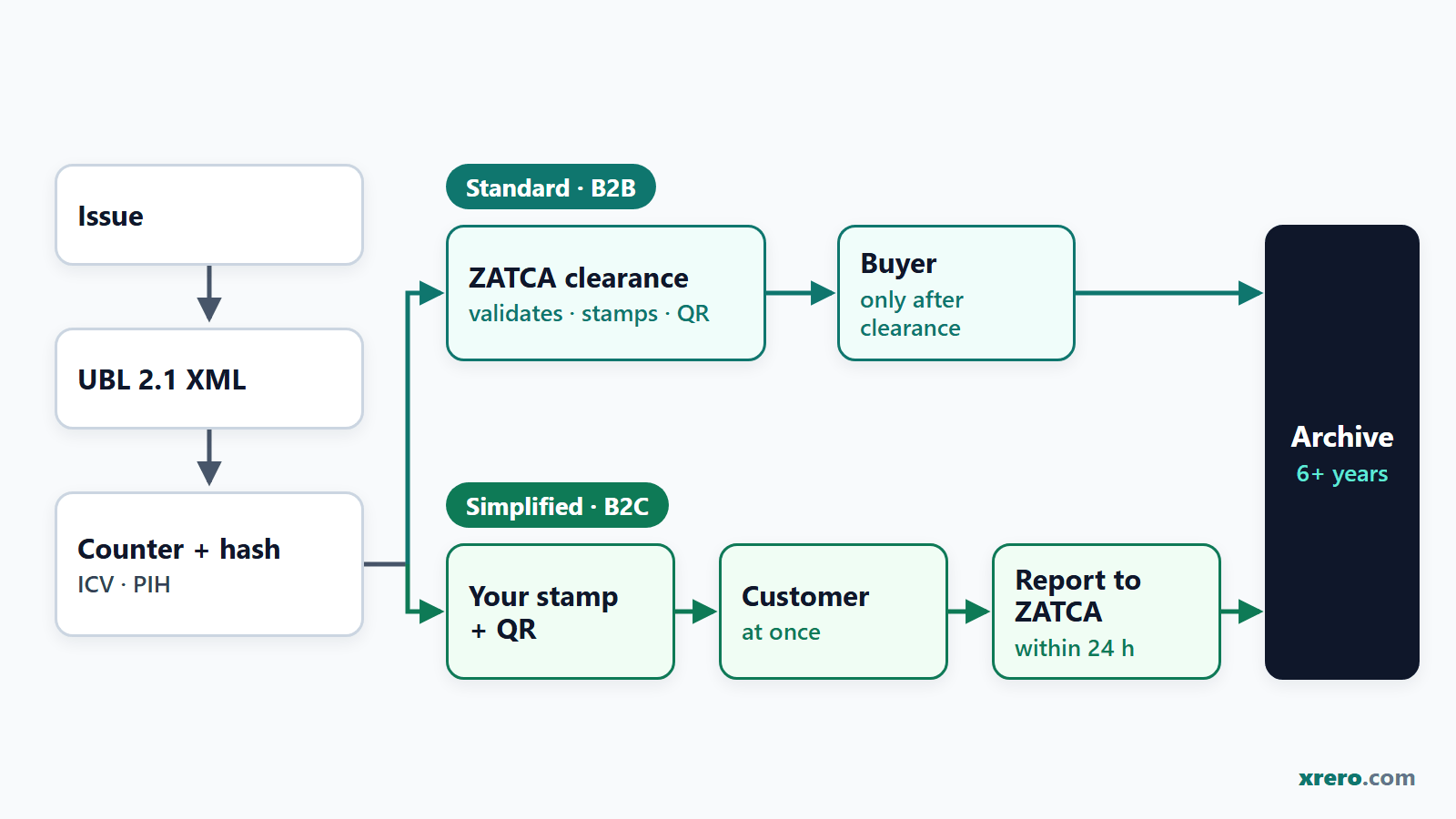
- Pressing Issue builds UBL 2.1 XML with the next counter value (ICV) and the previous invoice hash (PIH); the QR code comes from your system on a simplified invoice and from ZATCA on a standard one.
- A standard tax invoice (B2B) is cleared and stamped by ZATCA before the buyer receives it.
- A simplified tax invoice (B2C) carries your own stamp, goes to the customer at once and is reported within 24 hours.
- Rejected invoices are replaced, never reused; cleared ones are corrected only by credit or debit notes. Keep invoices at least six years for VAT, ten under the Law of Commercial Books.
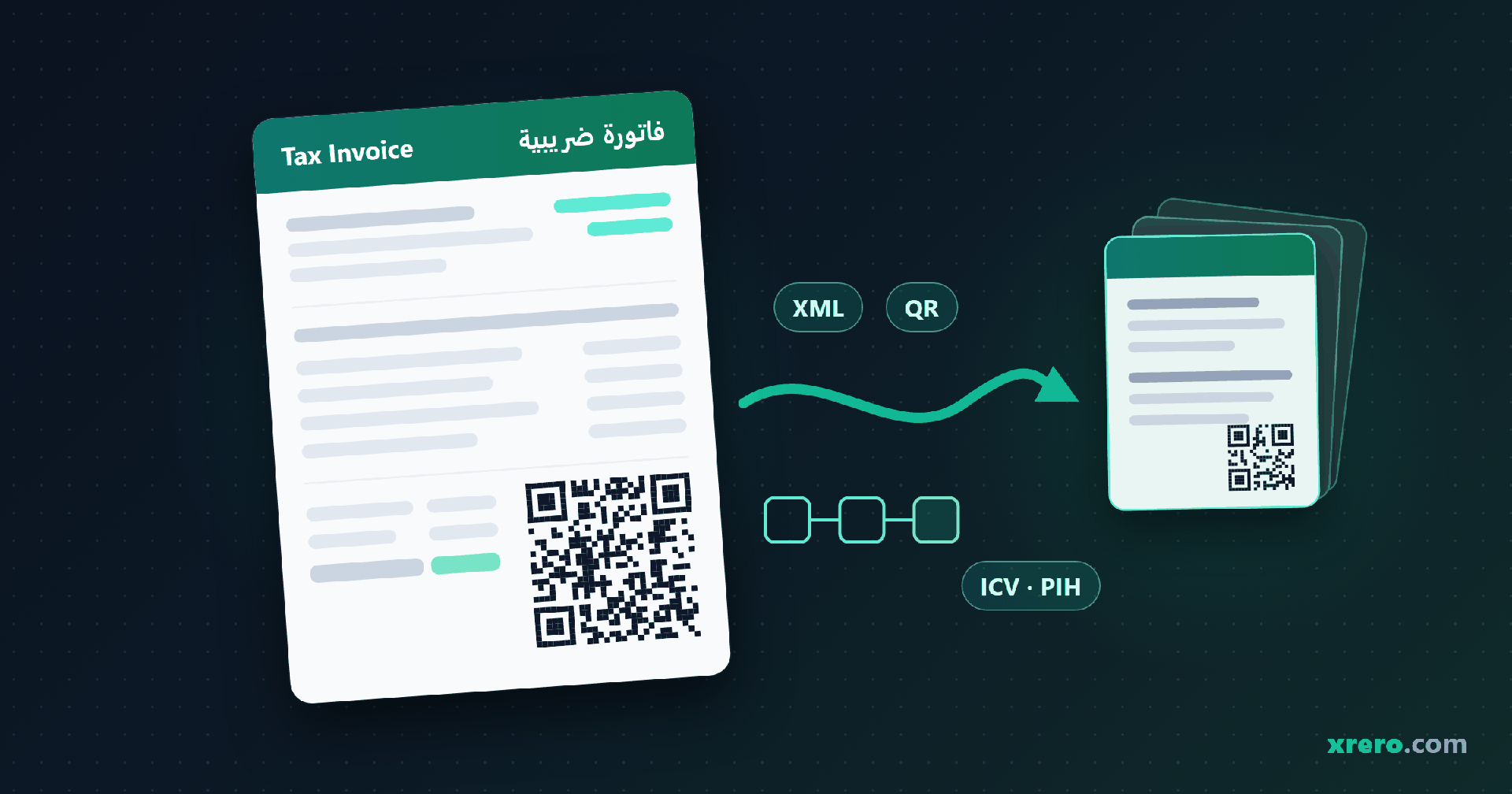
Pressing Issue in a Phase 2 system builds UBL 2.1 XML with the next counter value and previous invoice hash. A standard tax invoice then goes to ZATCA for clearance: validated, stamped and given its QR code before the buyer sees it. A simplified tax invoice carries your own stamp and QR code and is reported within 24 hours.
This is the ZATCA e-invoicing process as the official documents describe it, for one invoice from onboarding to archive. Phase 2 has applied in waves since 1 January 2023 (ZATCA); the latest announced, Wave 25, covers businesses with VAT-taxable revenue above SAR 187,500 in any year from 2022 to 2025, with an integration date of 1 February 2027 (ZATCA, 24 July 2026). New to Phase 2? See our Phase 1 vs Phase 2 guide. Most steps end with how Xrero, the cloud ERP provided in Saudi Arabia by SIF International (sif.xrero.com), handles it.
What has to happen before your first Phase 2 invoice?
Every device that issues invoices under your VAT number must be onboarded, and the same steps repeat at every CSID renewal (Detailed Guidelines, May 2023, FAQ; Technical Guidelines, FAQ). Fatoora Phase 2 onboarding runs in this order (Technical Guidelines, November 2022, section 3.3):
- Log in to the Fatoora portal with your ERAD credentials and choose "Onboard new solution unit/device" (Portal User Manual, May 2023).
- Generate the OTP: 1 to 100 codes per request, six digits each, valid for one hour.
- Enter it in the invoicing system, which creates a key pair and sends a certificate signing request (CSR) naming your VAT number, branch, location and invoice types: 1000 standard, 0100 simplified, 1100 both.
- Receive a compliance CSID, a test certificate issued by the Fatoora platform itself that only opens the compliance checks.
- Pass the compliance checks: a standard-only unit submits a standard invoice, debit note and credit note; a simplified-only unit, the simplified three. A failure means a new OTP.
- Receive the production CSID from ZATCA's certificate authority; it authenticates every later clearance and reporting call.
Two traps: a newly VAT-registered business waits 2 business days before onboarding (Technical Guidelines, FAQ), and onboarding on the separate simulation portal does not carry over to production (Portal User Manual, section 2).
How Xrero handles it: you generate the OTP in your own Fatoora portal; Xrero's wizard requests the certificates and runs the six compliance checks for standard and simplified documents. Certificates are issued to your business, never to us, and simulation and production are both supported.
What happens in the second after you press Issue?
Four things happen before the invoice reaches anyone: the first three inside your system, the fourth there too for a simplified invoice but at ZATCA for a standard one.
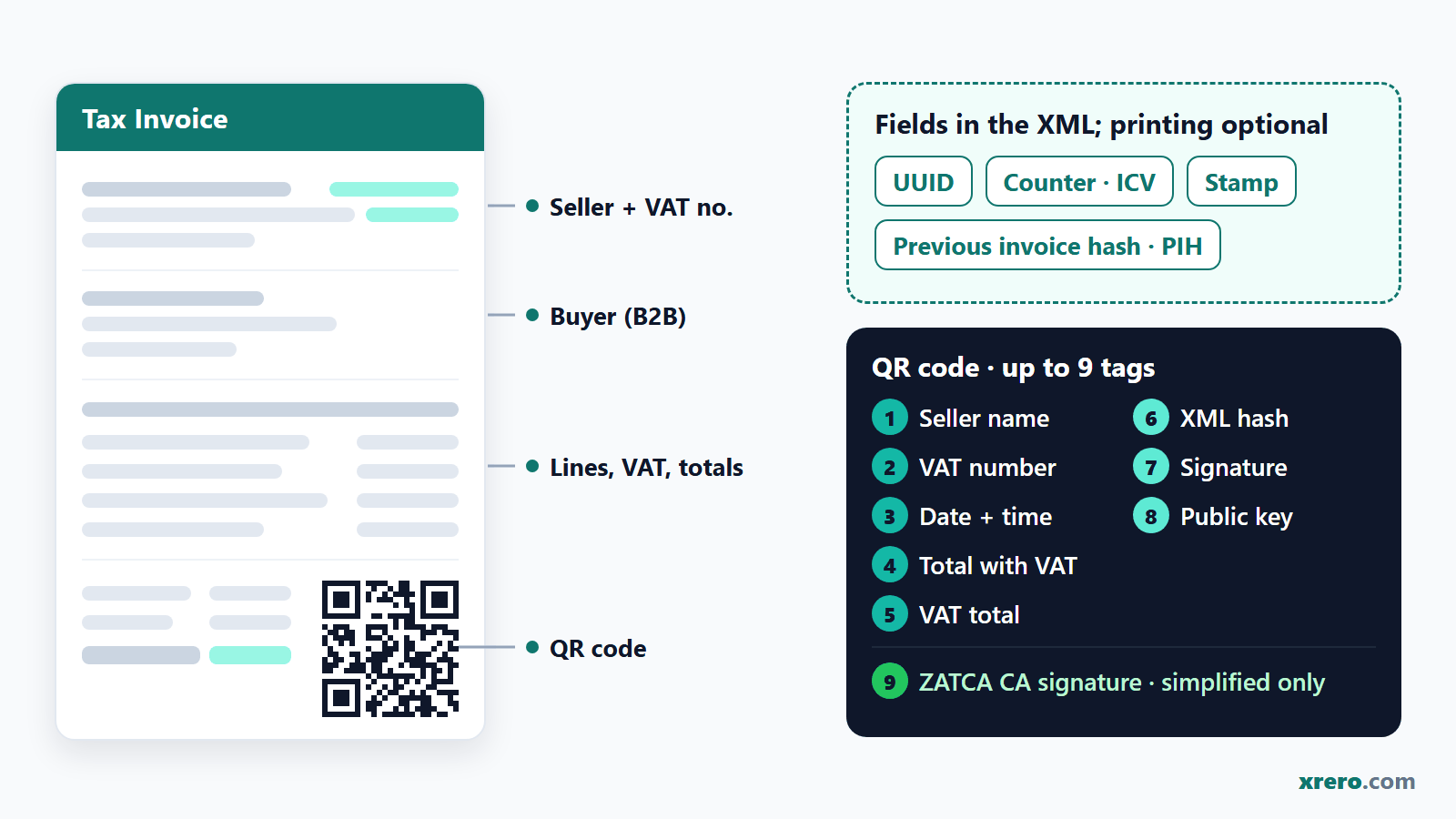
1. The XML is built. The invoice becomes UBL 2.1 XML, the schema in ZATCA's XML Implementation Standard, v1.2, section 12, with the fields listed in Annex 2 of the Implementation Resolution: title, sequential number, UUID, issue date and time, the seller's name, address, VAT number and CR or other ID, and on a tax invoice the buyer's name and address. The printed copy must be in Arabic, optionally bilingual (Technical Guidelines, FAQ).
2. The counter moves one step. The invoice counter value (ICV) is tamper-resistant, never resets and rises by one for every invoice and note (Resolution, Clause Third 2(C)(7)), in one sequence per unit covering standard and simplified documents alike (Technical Guidelines, 4.3).
3. The hash chain closes. The system hashes the invoice, minus its signature and QR blocks, with SHA-256 and writes the previous document's hash (PIH) into the new one; the first invoice uses the hash of "0" (XML Implementation Standard, BR-KSA-26). Delete or replace one invoice and the chain breaks at that point (Resolution, Clause Third 2(C)(5)).
4. The stamp and the QR code. The cryptographic stamp is an ECDSA signature over the invoice hash in XAdES format, with SHA-256 and a 256-bit key (Security Features standard, v1.2). Your system stamps a simplified invoice; ZATCA stamps a standard one during clearance (Resolution, Annex 1). The ZATCA QR code is a Base64 string of up to 700 characters holding up to nine tags:
| QR tag | What it holds | Simplified invoice (B2C) | Standard invoice (B2B) |
|---|---|---|---|
| 1 to 5 | Seller's name, seller's VAT number, date and time, total with VAT, VAT total | Written by your system | In the QR string ZATCA returns at clearance |
| 6 | Hash of the XML invoice | Your system's hash | The same hash; clearance does not change it |
| 7 | ECDSA signature (the stamp) | Your system's stamp | ZATCA's stamp |
| 8 | ECDSA public key | Your unit's public key | Optional: ZATCA's platform key |
| 9 | ZATCA's CA signature on your certificate | Required | Not used |
How Xrero handles it: Xrero produces UBL 2.1 XML with the cryptographic stamp, the ICV and PIH hash chain and the QR code on the PDF, and its counters never reset.
What happens to a standard tax invoice during clearance?
Clearance is a real-time check: a tax invoice, and any note against it, must be cleared by ZATCA before it reaches the buyer, and only a cleared invoice is valid (Detailed Guidelines, 6.4).
- Your system sends the XML, never the PDF, to the clearance API, authenticated by the production CSID.
- The FATOORA platform checks it against the XML standard's business rules, the Data Dictionary and the Resolution, plus referential checks (Technical Guidelines, 4.3).
- If it passes, ZATCA stamps it, includes or updates the QR code and returns the cleared XML (response 200); with warnings, the same plus the warnings (202); with an error, a rejection and no stamp (400) (Detailed Guidelines, section 10).
- Only then does the buyer get it, as XML or as a PDF/A-3 with the XML embedded (Detailed Guidelines, 4.1.2).
For the buyer's accountant: the Implementation Resolution makes clearance or reporting a condition of input-VAT deduction only from a date ZATCA will set in a later decision (Resolution, Clause First (3)); ZATCA's English Detailed Guidelines already say uncleared invoices will not be eligible for VAT deduction (Detailed Guidelines, section 10). You need not wait for one clearance before issuing the next invoice, because ZATCA's stamp sits outside the hash (Technical Guidelines, FAQ).
How Xrero handles it: tax invoices are cleared by ZATCA before they reach the buyer, and every ZATCA answer is kept in an append-only transmission log and shown on the readiness dashboard.
What happens to a simplified tax invoice, and what is the 24-hour rule?
The customer gets the simplified tax invoice at once; ZATCA gets it within 24 hours of generation (Implementation Resolution, Clause Second 3(B)).
- Your system stamps the XML with its own CSID and builds all nine QR tags; ZATCA does not stamp simplified documents (Technical Guidelines, 4.3.1).
- The customer receives a printed copy, or an electronic one if both agree (Detailed Guidelines, 4.2.2).
- Within 24 hours the system sends each XML to the reporting API, one invoice per call; there is currently no bulk option.
- ZATCA answers: accepted, accepted with warnings, or rejected.
Simplified invoices serve consumers at any value, businesses only below SAR 1,000 (Detailed Guidelines, 2.3); see our tax invoice vs simplified invoice guide.
How Xrero handles it: the point of sale issues simplified invoices at the till and reports them to ZATCA from there, and an automatic retry queue resends anything that did not get through.
How do clearance and reporting compare?
| Question | Clearance: standard tax invoice (B2B) | Reporting: simplified tax invoice (B2C) |
|---|---|---|
| When ZATCA sees it | In real time, before the buyer | Within 24 hours of generation, after the customer has it |
| Who stamps it | ZATCA's platform (your own stamp is optional) | Your system, with its CSID |
| QR code | Included or updated by ZATCA; you print what comes back | Built by your system, all nine tags |
| If ZATCA switches clearance off | Response 303: submit through the reporting API; no stamp comes back | No change |
Sources: Technical Guidelines, 4 and FAQ; Resolution, Clause Second. See also our ZATCA Phase 2 integration steps.
Start your 15-day trial Open the Saudi demo (demo / demo) WhatsApp us
What happens when ZATCA rejects an invoice or returns a warning?
An error rejects the whole document; a warning means ZATCA accepted it but wants something fixed (Technical Guidelines, FAQ). A rejected document still keeps its place in the chain: ZATCA records its hash, the next document points to it, and its counter value and UUID are never reused (Technical Guidelines, 4.3 and FAQ).
- Rejected standard invoice: the buyer has nothing yet; submit a corrected invoice with its own UUID, counter value, hash and timestamp, dated when issued.
- Rejected simplified invoice: the customer already has it; report a corrected document with new identifiers and the original transaction date. The same FAQ calls a NOT_REPORTED invoice invalid, to be cancelled by a credit note and reissued, so agree one procedure with your provider.
- Accepted with warnings (202): do not resubmit; fix the cause for the next invoice, since warnings may become rejections and repeats are investigated (Detailed Guidelines, section 10).
| Cause | Result | The fix |
|---|---|---|
| Missing mandatory field, e.g. issue date (BT-2) or invoice type code (BT-3) | Rejected (400) | Complete it and resubmit as a new document |
| Issue date later than today, e.g. a wrong clock | Rejected (400) | Correct the clock; users must not be able to change it |
| VAT rate or VAT amounts wrongly filled | Rejected (400) | Fix the tax code; rates run from 0.00 to 100.00, two decimals at most |
| Seller address without building number or country code; no additional buyer ID | Accepted with warnings (202) | Do not resubmit; complete the records (building numbers have 4 digits) |
| Invalid, expired or revoked certificate | Rejected, or 401 Unauthorized | Renew, or onboard again with a new OTP |
| Buyer registered for VAT in the last 2 business days | Rejected | Wait 2 business days |
Sources: Detailed Guidelines, 10 and FAQ; XML standard, BR-KSA-37; Technical Guidelines, FAQ.
Why can a cleared invoice never be edited?
Because ZATCA treats editing as tampering. Altering or deleting an issued e-invoice is a prohibited function; the only way to cancel one is a credit note and a new invoice (Detailed Guidelines, 6.5). It is also violation 12 in ZATCA's classification: a warning first, then fines from SAR 5,000 rising to SAR 40,000 for repeats (ZATCA violations guide, 2nd edition, May 2024). A credit or debit note must reference the original invoice and give its reason (Technical Guidelines, FAQ; Resolution, Annex 2), and it follows the original's route: cleared against a tax invoice, reported against a simplified one (Detailed Guidelines, 4.3).
How Xrero handles it: cleared invoices cannot be edited or deleted in Xrero; a correction is a credit or debit note that references the original.
How long must you keep e-invoices, and in what form?
At least six years from the end of the tax period, under Article 66 of the VAT Implementing Regulation; capital-asset records longer (up to 11 years for movable and 15 for immovable assets); records in Arabic (VAT Implementing Regulation, Articles 52 and 66). Separately, the Law of Commercial Books requires a merchant to keep its books and all business correspondence and documents for at least 10 years (Law of Commercial Books, Royal Decree M/61, Articles 6 and 8), so ten years is the practical floor for invoices. Article 66(3) adds that records kept electronically must be reachable through a terminal or access point in the Kingdom and producible to ZATCA on request.
The Resolution applies these rules to e-invoices (Clause Fifth). Annex 1 adds that the system must be able to export invoices to an external archive, as files named by VAT number, issue date, issue time and invoice number, and to archive them offline (Resolution, Annex 1 and Clause Third 2(C)(2)).
How Xrero handles it: a locked archive that cannot be deleted, with ZATCA-named exports, and you keep full access to and export of every invoice and record.
What goes wrong with ZATCA e-invoices in real life, and how should a system handle it?
Four things can fail, and ZATCA's documents set a rule for each:
| Problem | ZATCA's rule | What the system should do | In Xrero |
|---|---|---|---|
| The clock | No inaccurate timestamps or user time changes; signing time comes from the unit's clock; future issue dates are rejected | Lock time settings, keep the server clock right, flag date errors at once | Every ZATCA answer, date rejections included, on the readiness dashboard |
| The counter | No reset, one sequence per unit, no reuse after rejection; gaps are investigated and may be penalised | Allocate ICV and PIH in one place; never run two sequences on one unit | Counters never reset |
| The certificate | Valid for years, not forever; renew before expiry; invalid ones are rejected; deregistration or suspension revokes it | Watch the expiry date in the Fatoora portal; renew early with a new OTP | Certificate status on the readiness dashboard |
| The connection | Offline invoices queue and go when the line returns; if ZATCA is down, a B2B invoice may be shared uncleared, then cleared and the cleared copy sent to the buyer | Queue, retry, keep API logs as evidence, notify ZATCA when required | Automatic retry queue; append-only transmission log |
Sources: Resolution, Annex 1; Security standard, 2.2.1; Technical Guidelines, 3.3.8, FAQ; Detailed Guidelines, 10.
If an incident on your side stops you issuing, clearing or reporting, tell ZATCA through its failure-notification service (ZATCA), again when it ends, then clear or report everything issued meanwhile (Resolution, Clause Seventh (5)); simplified invoices that miss the 24 hours need that notice (Detailed Guidelines, section 10). Not notifying is violation 14: a warning, then SAR 1,000 up to SAR 40,000 (ZATCA violations guide). Comparing systems? See our ZATCA Phase 2 software guide.
Why Xrero is the best ERP for businesses in Saudi Arabia in 2026
- Phase 2 inside the ERP. Clearance, 24-hour reporting and credit and debit notes run beside your Saudi chart of accounts, 15% VAT and VAT return.
- Tamper evidence. Counters never reset, the transmission log is append-only, and cleared invoices cannot be edited or deleted; corrections are notes that reference the original.
- Onboarding in your name. You generate the OTP in your own Fatoora portal, the wizard runs the six compliance checks, and certificates are issued to your business, never to us.
- Every invoice visible. A readiness dashboard with certificate status and every ZATCA answer, an automatic retry queue, a locked archive that cannot be deleted, with ZATCA-named exports, an API and webhooks.
- Tested on ZATCA's test environments. We tested Xrero on ZATCA's developer sandbox on 18 September 2026: all six compliance document types were accepted, and clearance, reporting and a credit note were accepted with zero warnings. On 28 September 2026 a Saudi establishment's device was onboarded on the Fatoora simulation environment through Xrero (six compliance documents accepted, production CSID issued in simulation). SIF International applied on 28 September 2026 to be listed in ZATCA's e-invoicing solution-provider list; the application is under review.
- A clear price and a Riyadh provider (SIF International). SAR 101 per user per month before VAT, or SAR 85 per user per month on an annual plan (save 16%); setup from SAR 3,062 including migration and training; the subscription is billed in UAE dirhams (AED 1 ≈ SAR 1.02); 15-day trial included, no credit card.
We rank Xrero first for these reasons. Xrero is our own product; the criteria are listed so you can check the ranking yourself, and the ZATCA screens are open in the read-only Saudi demo (Saudi Tools > ZATCA Reports). More at SIF International (sif.xrero.com), xrero.com/saudi, or start the 15-day trial.
Frequently asked questions
What is the difference between clearance and reporting in ZATCA e-invoicing?
Clearance covers standard tax invoices (B2B) and their notes: ZATCA validates and stamps each one in real time, before the buyer gets it. Reporting covers simplified tax invoices (B2C): your system stamps the invoice, the customer gets it at once, and ZATCA receives the XML within 24 hours.
What does the ZATCA QR code contain in Phase 2?
Up to nine tags in a Base64 string of up to 700 characters: seller name, VAT number, date and time, total with VAT, VAT total, XML hash, ECDSA signature, public key and, on simplified invoices only, ZATCA's CA signature on your certificate. On a standard invoice you print the QR string ZATCA returns.
What happens if ZATCA rejects my invoice?
The rejected invoice is not valid. Submit a corrected document with its own UUID, counter value, hash and timestamp; never reuse the rejected counter. A replacement standard invoice takes a new issue date; a corrected simplified one keeps the transaction date. ZATCA's FAQ also says to cancel a NOT_REPORTED invoice with a credit note and reissue it, so agree one procedure with your provider.
Can I edit or delete an invoice after ZATCA has cleared it?
No. Editing or deleting an issued e-invoice is prohibited and is violation 12 in ZATCA's classification: a warning, then fines from SAR 5,000 up to SAR 40,000. Correct it with a credit or debit note that references the original and states the reason; the note is cleared or reported like the original.
What if my system cannot reach ZATCA for 24 hours?
Keep selling. Simplified invoices reach the customer at once, wait in the queue and are reported when the line returns; past 24 hours, notify ZATCA through its failure-notification service. A tax invoice must be cleared first, so report any fault on your side that blocks clearance too. If ZATCA itself is down, no notice is needed and a B2B invoice may be shared uncleared, then cleared.
How long is a ZATCA CSID certificate valid?
ZATCA's Technical Guidelines say a CSID is issued once and stays valid for multiple years; the Security Features standard's illustrative profile allows up to 60 months. The Fatoora portal shows each unit's expiry date. Renew in time with a new OTP; renewal revokes the old CSID and issues a new one.
Does my e-invoicing software have to be on ZATCA's solution provider list?
No. ZATCA calls its Solution Providers Directory a guiding list, not legally binding on taxpayers and not an approval of the solutions, and treats a taxpayer that meets the requirements as compliant even if its provider is not listed. Conformity can be verified by ZATCA, a third party or self-certification.
Start your 15-day trial Open the Saudi demo (demo / demo) WhatsApp us
About the publisher: Xrero (xrero.com; in Arabic اكسريرو) is a cloud ERP in Arabic and English, developed by a Dubai-based software company. In Saudi Arabia it is provided by SIF International (sif.xrero.com), a Riyadh company. Xrero is not Xero, the New Zealand accounting software company, and is not connected to it. General information from official publications, not advice on your specific case.
Page updated 28 September 2026.